



Google Shopping for Ecommerce: A Simple Guide to Getting More Sales
by Yash PalGoogle Shopping has changed a lot over the years.
The way Google Shopping campaigns work today is very different from how they worked when the platform first launched. We have seen the move from the early days of product listing ads and traditional Shopping campaigns to Smart Shopping, Performance Max and today’s increasingly automated approach.
We have been managing Google Shopping since its launch.
We have seen every major version of the platform and, more importantly, understand how it actually works inside real ecommerce accounts.
Over the years, we have worked across different types of ecommerce businesses, product catalogues and Shopping challenges – from stores with thousands of products and Merchant Center disapprovals to feeds that needed major improvements, campaigns that were spending without generating enough return, and accounts that simply needed a better structure.
One thing has remained consistent: Google Shopping isn’t just about creating a campaign and setting a budget.
There is much more happening behind the scenes.
Your product feed, Google Merchant Center, product titles, images, pricing, campaign settings, conversion tracking and website all play an important role. When these pieces work together, Google has a clearer understanding of your products and their relevance to potential shoppers.
That’s what this guide is about.
We will keep things simple and explain how Google Shopping works, what makes a Shopping account healthy, where things can go wrong, and what ecommerce businesses should focus on when looking to grow their sales.
What Is Google Shopping?
Google Shopping allows ecommerce businesses to promote their products when people are searching for products on Google.
Unlike a traditional text ad, Shopping ads can show product information directly in the search results, including things such as:
- Product image
- Product name
- Price
- Store name
- Availability
- Other product information
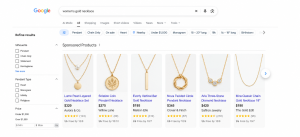
This gives shoppers an opportunity to see and compare products before they even visit a website.
For example, someone searching for “women’s gold necklace” may see several products from different stores.
They can compare the products, look at the prices and images, and then click on the product they are interested in.
That’s one of the main advantages of Google Shopping.
The shopper gets to see the product before deciding whether to visit your website.
But there is an important part behind all of this that many ecommerce businesses don’t pay enough attention to.
Your Product Feed Is the Foundation
Your Google Shopping campaign is only as good as the product information you provide to Google.
Think of your product feed as the information Google uses to understand your products.
A typical feed can include:
- Product title
- Product description
- Product URL
- Price
- Availability
- Product image
- Brand
- GTIN
- Product category
- Product type
- Shipping information
- Other product attributes
Google uses this information, along with other signals, to understand your products and determine where they may be relevant.
This is why feed optimisation is such an important part of Shopping.
If your product information is incomplete, unclear or inaccurate, Google may have less useful information to work with.
Why Product Title Matters
Let’s take a simple example.
Imagine you sell running shoes. A product title such as: “Runner Pro” doesn’t tell Google or the shopper much. A more descriptive title could be:
“Men’s Lightweight Running Shoes – Breathable Road Running Trainers”
Now the product is much easier to understand. The shopper knows what the product is, and Google has more information about it. This doesn’t mean you should stuff your product titles with keywords. The goal is simply to describe the product clearly.
A good title should help answer basic questions such as:
What is the product?
Who is it for?
What type of product is it?
What are its important characteristics?
The right approach will depend on the type of product you are selling.
Your Feed Isn’t a Set-and-Forget Task
One of the biggest mistakes we see with ecommerce businesses is treating the product feed as something that only needs to be set up once.
- It doesn’t work that way.
- Your store is constantly changing.
- You add products.
- Products go out of stock.
- Prices change.
- New variants are added.
- Products are discontinued.
- Product names and descriptions change.
- Your website changes.
- Your feed needs to keep up.
Google Merchant Center provides tools to help merchants monitor product information, product status and issues affecting product visibility.
Regular feed reviews can help identify problems such as:
- Missing product information
- Incorrect pricing
- Incorrect availability
- Product disapprovals
- Missing identifiers
- Image issues
- Incorrect categories
- Shipping problems
- Website and feed mismatches
These may seem like small things.
But if you have hundreds or thousands of products, a small issue can affect a large part of your catalogue.
Google Merchant Center: The Connection Between Your Products and Google
Google Merchant Center is an important part of the Shopping ecosystem.
It’s where your product information is provided to Google and where you can monitor the status of your products.
Depending on your ecommerce platform and setup, product information can be provided to the Merchant Center in different ways, including through feeds and supported ecommerce integrations.
The method isn’t necessarily the most important thing. What matters is that the information reaching Google is accurate, complete and up to date.
Merchant Center can also help you identify products that have issues or aren’t eligible to appear as expected.
That’s why we usually recommend checking Merchant Center alongside Google Ads.
If you only look at the campaign dashboard, you can sometimes miss the real problem.
Google Shopping vs Google Search Ads
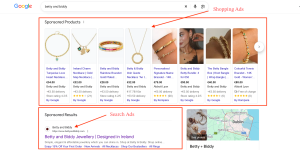
Google Shopping is different from traditional Search campaigns.
With a typical Search campaign, advertisers select keywords and create text ads around those searches. Shopping is much more product-focused.
Instead of simply telling Google:
“Show my ad when someone searches for this keyword.”
you provide Google with detailed information about your product.
Google can then use that product information and other signals to determine when the product may be relevant.
This makes the quality of your product data especially important.
For ecommerce businesses, this is one of the biggest differences between traditional Search advertising and Shopping.
Where Does Performance Max Fit In?
Performance Max has become an important campaign type for ecommerce advertisers.
It allows Google to use automation across Google’s advertising inventory and can use your Merchant Center product information for ecommerce advertising.
Automation can be useful. It allows Google to process huge amounts of data and make decisions much faster than a person could manually.
But automation doesn’t mean you can ignore the fundamentals.
In fact, good product information becomes even more important when you are relying heavily on Google’s automated systems.
The better Google understands your products, the better information it has to work with.
Automation Doesn’t Mean “Set It and Forget It”
Google has become much more automated over the years. That’s a major change from the early days of Google Shopping.
But there’s a big difference between using automation and leaving everything to automation.
Even with automated campaigns, someone still needs to look at the business results.
For example:
- Which products are generating sales?
- Which products are consuming a budget?
- Which products have strong margins?
- Which products aren’t converting?
- Is the feed healthy?
- Are conversions being tracked correctly?
- Is the website converting visitors?
- Is the campaign spending money in the right areas?
Automation can handle a lot of the work. But it still needs good inputs and proper oversight.
Why Some Google Shopping Campaigns Don’t Perform
When a Shopping campaign isn’t producing the expected results, the first question is often:
“Should we increase the budget?”
Sometimes budget is part of the problem. But it isn’t always the answer. Before increasing spending, there are several things worth checking.
1. Product Disapprovals
If important products are disapproved in the Merchant Center, those products may not be eligible to appear. Increasing your campaign budget won’t solve that problem.
2. Weak Product Titles
If your product titles are too generic, Google may have less information to understand exactly what you are selling.
3. Poor Product Organisation
Large product catalogues can become difficult to manage.
Product categories, product types and custom labels can help organise products and make performance easier to analyse.
4. Feed and Website Don’t Match
Your product information should match what customers see on your website. If your feed says one price and the website shows another, that’s a problem. The same applies to product availability and other important information.
5. Tracking Problems
If your conversion tracking isn’t working correctly, you may be making decisions based on inaccurate data. Before changing campaigns, it’s worth making sure the data you are using is reliable.
6. Looking Only at Campaign Settings
Sometimes the campaign isn’t the main problem. The feed, Merchant Center, website or tracking may need attention first.
This is one reason we look at the complete Shopping setup rather than only the campaign settings.
Feed Optimisation Isn’t Keyword Stuffing
When people hear “product feed optimisation,” they sometimes think it means adding as many keywords as possible to product titles.
That’s not the goal.
Good feed optimisation is about making your product information clear, accurate and useful.
For example:
Before:
Black Bag
Better:
Women’s Black Leather Crossbody Bag – Adjustable Shoulder Strap
The second title provides more useful information.
The same principle applies to other product attributes. The goal isn’t to make your feed complicated. The goal is to make it easier for Google to understand your products and easier for shoppers to understand what you are selling.
Your Website Is Part of Your Shopping Strategy
Getting someone to click your Shopping ad is only half the job. You still need to turn that visitor into a customer.
Imagine someone searches for a product, clicks your ad and lands on a slow or confusing product page. They may simply leave. That’s why we don’t look at Google Shopping in isolation.
The complete journey looks something like:
Search → Product Ad → Product Page → Cart → Checkout → Purchase
Every stage matters.
Your product page should make it easy for someone to understand the product, see the price, view images, understand shipping and complete their purchase.
A good Shopping campaign can bring relevant traffic. But your website still needs to convert that traffic.
Google Shopping Needs Ongoing Management
A Shopping account shouldn’t normally be treated as a one-time setup.
- Your business changes.
- Your products change.
- Your customers change.
- Your competitors change.
- Google changes.
That means your shopping strategy needs to evolve too.
Regular management can include:
- Checking Merchant Center
- Reviewing product disapprovals
- Monitoring feed health
- Improving product titles
- Reviewing product performance
- Checking spend
- Looking at revenue and conversions
- Identifying products that are wasting budget
- Finding products with growth potential
- Reviewing conversion tracking
- Checking landing pages
- Updating product information
- Adjusting campaigns when needed
The exact approach will depend on the business and its goals.
A store with 30 products won’t need the same approach as a store with 30,000 products.
Managing Google Shopping Since Launch
This is where our experience makes a difference.
We have seen the platform go through its different stages and have worked with the changes as Google has moved towards more automation.
We have worked with traditional Shopping campaigns, Smart Shopping, Performance Max and the different feed and Merchant Center environments that have come along the way.
More importantly, we have seen how these changes work in real ecommerce accounts.
- We have seen what happens when a feed is poorly structured.
- We have seen what happens when important products are disapproved.
- We have seen campaigns where the problem wasn’t the campaign at all.
- We have also seen how fixing the fundamentals can make a much bigger difference than constantly changing bids or budgets.
That’s why our approach isn’t simply:
“Create a campaign and let Google do the rest.”
We look at the complete system:
Product Feed → Merchant Center → Google Ads → Product Page → Conversion Tracking → Sales
Each part has a job.
And each part needs to work properly.
How We Approach Google Shopping
When we take on a Google Shopping account, we first want to understand the business.
Not just the advertising account.
We want to understand:
- What products does the business sell?
- Which products are most important?
- What are the margins?
- What is the average order value?
- Which products sell well?
- Which products don’t?
- What does a profitable sale look like?
- What are the business goals?
Once we understand that, we can look at the Shopping account in the right context.
Product Feed
We review the information being sent to Google and look for opportunities to improve product data.
Merchant Center
We check product status, disapprovals, warnings and other issues that could affect visibility.
Product Structure
We look at how products are organised and whether segmentation can make campaign management and reporting more useful.
Campaigns
We review campaign structure, budgets, bidding and performance.
Conversion Tracking
We check whether the conversions being reported actually represent meaningful business actions.
Website
We also look at what happens after the click. Because getting traffic is only useful if the website can turn that traffic into customers.
Google Shopping for Different Ecommerce Businesses
There isn’t one Google Shopping strategy that works for every business.
A small ecommerce store with 20 products may need a very different setup from a business with 20,000 products.
Other factors matter too:
- Product margins
- Average order value
- Sales volume
- Competition
- Seasonality
- Conversion rate
- Budget
- Brand demand
- Business objectives
That’s why we don’t believe in copying another company’s Shopping setup and expecting the same results.
The strategy should fit the business.
What Makes a Good Google Shopping Strategy?
There isn’t a single campaign structure, bidding strategy or feed format that will work for every ecommerce business. A good shopping strategy starts with understanding the business and getting the fundamentals right.
That means:
- Accurate product data.
- A healthy Merchant Center account.
- Clear product information.
- Reliable conversion tracking.
- A website that provides a good buying experience.
- Campaigns that are aligned with the business goals.
- And most importantly, ongoing management and optimisation.
The Biggest Google Shopping Lesson
After managing Google Shopping for so many years, one thing has remained consistent:
Google Shopping isn’t just about running ads. It’s about making sure all the different pieces work together. Your feed tells Google what you are selling. Merchant Center manages your product information and highlights issues. Your campaigns help put those products in front of potential customers. Your website turns clicks into customers. Your conversion tracking tells you what is actually happening. And ongoing optimisation brings everything together.
If one part isn’t working properly, simply spending more money may not solve the problem.
Final Thoughts
Google Shopping can be an important sales channel for ecommerce businesses. But getting the most from it requires more than creating a campaign and setting a daily budget.
Start with the basics.
- Keep your product information accurate.
- Optimise your feed.
- Keep the Merchant Center healthy.
- Use clear product titles and good product images.
- Make sure your website matches your feed.
- Track the right conversions.
- And regularly review where your advertising budget is going.
- Most importantly, don’t think of Google Shopping as just another advertising campaign.
- Think of it as a complete ecommerce system.
Good products + good product data + a healthy Merchant Center + the right campaign strategy + a website that converts = a stronger Shopping foundation.
And when you have been managing Google Shopping since launch, you learn that the fundamentals continue to matter, even as the platform changes.
Google Shopping will continue to evolve.
- The tools will change.
- The automation will change.
- The campaign types will change.
But the need to understand your products, your customers and your data won’t.
That’s where experience matters.
Want to Get More From Google Shopping?
Managing Google Shopping is more than just setting up campaigns and increasing budgets. Your product feed, Merchant Center, campaign structure, tracking and website all need to work together.
If you’re looking to improve your Google Shopping performance, fix feed issues, or build a stronger Shopping strategy, our team can help.
Get in touch with CueForGood to discuss your Google Shopping requirements.
- About the Author
- Latest Posts

I am the Division Head of Digital Marketing (CSE) at CueForGood, specializing in Google Shopping Ads, product feed optimization, Comparison Shopping Engines (CSEs), Amazon, eBay, and eCommerce marketplace marketing. I help brands improve product visibility, optimize shopping campaigns, and drive measurable online growth.

Yash Pal
I am the Division Head of Digital Marketing (CSE) at CueForGood, specializing in Google Shopping Ads, product feed optimization, Comparison Shopping Engines (CSEs), Amazon, eBay, and eCommerce marketplace marketing. I help brands improve product visibility, optimize shopping campaigns, and drive measurable online growth.
MORE POSTS-
Google Shopping for Ecommerce: A Simple Guide to Getting More Sales
by Yash PalGoogle Shopping has changed a lot over the years. The way Google Shopping campaigns work today is very different from …
Continue reading “Google Shopping for Ecommerce: A Simple Guide to Getting More Sales”
-
How to audit what AI is saying about your brand in 30 minutes
by Rajiv Singha
AI visitors convert at 4.4x the rate of traditional organic traffic. And AI search traffic is up 527% year on …
Continue reading “How to audit what AI is saying about your brand in 30 minutes”
-
Sustainable vs Green Marketing: Key Differences and When to Use Each
by Tapam Jaswal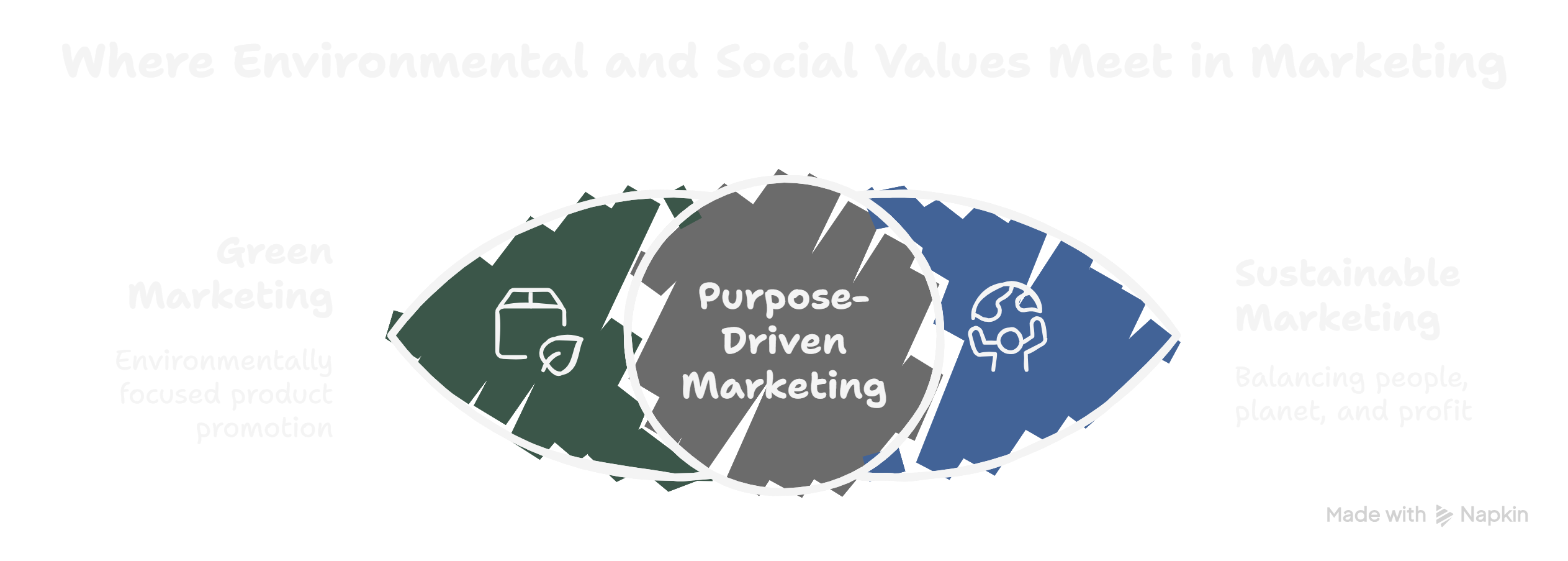
You’ll see the terms “green marketing” and “sustainable marketing” used interchangeably online. They are not the same. Here’s a side-by-side …
Continue reading “Sustainable vs Green Marketing: Key Differences and When to Use Each”
-
Why Feed-Only PMax Campaigns Are the Smartest Choice for Ecommerce stores
by Yash Pal
If you sell products online, you have probably heard about Google’s Performance Max (PMax) campaigns. They have been a hot …
Continue reading “Why Feed-Only PMax Campaigns Are the Smartest Choice for Ecommerce stores”
-
Email Marketing Without Fatiguing Conscious Consumers
by Charanjeev Singh
How to build trust, reduce inbox overload, and engage with intention Email marketing is a powerful tool. It lets …
Continue reading “Email Marketing Without Fatiguing Conscious Consumers”
-
How to Market Vegan Products Without Preaching (or Losing Sales)
by Tapam Jaswal
Marketing vegan products isn’t just about talking to people who already follow a vegan lifestyle. It’s also about connecting with …
Continue reading “How to Market Vegan Products Without Preaching (or Losing Sales)”